Before I really get into the technical side of developing Osseux, I should clear up exactly what I think it will be. To get there, though, I have to walk through some of my thinking on tools.
I’ve toyed around with Twine quite a bit (you can catch one of my more experimental Twine pieces here), and I really like the idea of creating a game centered around interactive dialogue—but I’m not fully satisfied with Twine’s implementation. It’s good enough to make a traditional dialogue system that you’d find in an RPG like Divinity: Original Sin or Fallout, but I don’t find that it makes for much of a gameplay loop; the extent of your interaction is making a face-up choice and maybe hiding some RNG elements behind it. You’re either working with pure text or whatever 2D art you can muster, but it’s always going to feel like a choose your own adventure book to me. Without the context of a larger game, dialogue trees are difficult to make appealing.
So I want to obscure the fact that you’re working with a dialogue tree. I don’t want you to look at a decision and feel like you have options A, B, and C—I’d rather you feel like your decision is a part of a puzzle. I’d like to make the game seem tactile.
I mentioned in my last post that Cultist Simulator is a big inspiration for Osseux, and the first case for that lies in the way you control the game. To give a brief overview:
All of Cultist Simulator takes place on a single table. Interactable objects take three forms: events, nouns, and verbs. Events generate nouns and aren’t usually interactable. Nouns are all of the possible interactable objects in the game. They’re your in-game stats, your emotions, your colleagues, your enemies—everything. Verbs are static objects on the board that you insert nouns into to do something. The big draw of the game is learning to interact with this system to advance your character, build your cult, and complete one of a number of victory conditions.

And this system feels good. Every time you pick up or put down a card you hear a little clack. You can click on an empty slot in a verb to see which nouns have an interaction. Every time you start or finish an action, you get a tidbit of description or lore. You feel like an alchemist or a student in esoteric and forbidden knowledge. The structure of the game reinforces the ludonarrative.
Suffice it to say, I want something more linear and shorter than Cultist Simulator. I’m a one-man team, I don’t have the level of technical expertise I’d need, and I’m not made of time. So here’s my thought: I want to produce a dialogue tool that uses cards instead of text for player input. If you are speaking to a character, you should be able to drag other characters or objects into the conversation to make queries or answer your interlocutor’s questions.
Right off the bat, I’m aware that I’m looking at writing a lot of text. Not every character needs unique lines to address every object in the game, but I’ll have to write dialogue and description in a way that leads players to find feasible ways through scenes.
But dialogue is pretty far off at this point. It isn’t really feasible to write out conversations or fully build out characters when we don’t have a playable system for interacting with them. Information is meaningless unless we can convey it to our players. I’m more interested in writing a game than a short story or a wiki article, and I have to know what stories these mechanics will actually allow me to tell. So what exactly can I do?
Let’s go through the key points of my design doc. Or the Sparknotes version, at least.
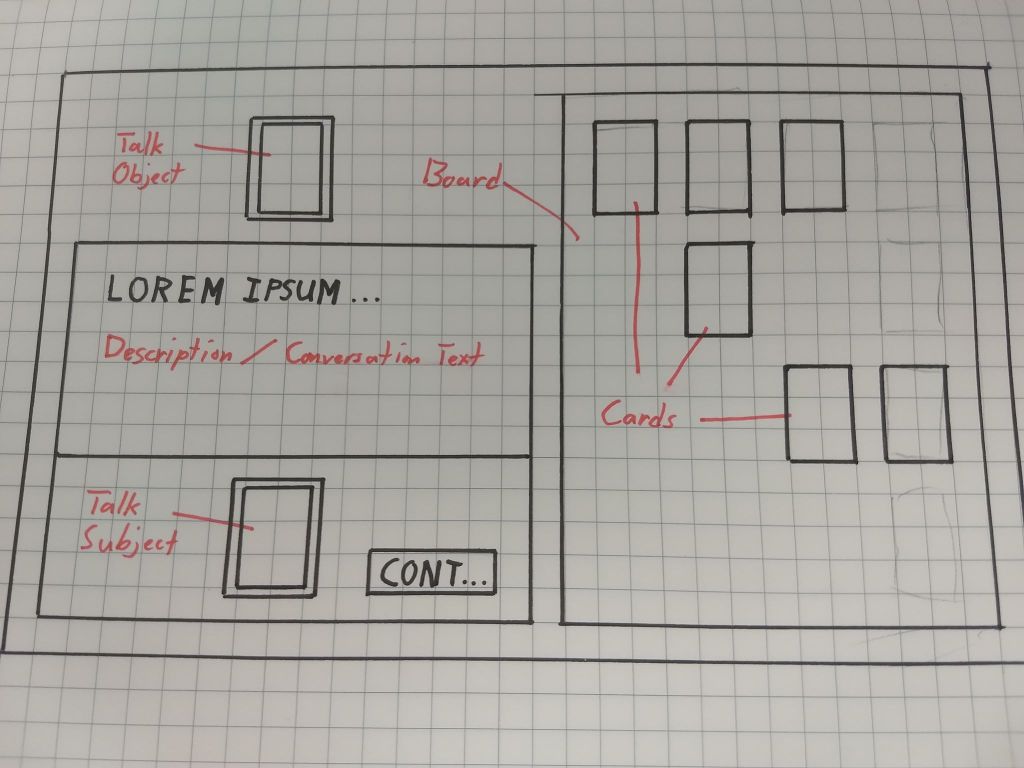
Cards: Every single interactable object in the game takes the form of a card. These are characters, places, objects, etc. Basically all player interaction comes from dragging and dropping these in different locations.
Board: Every single card that the player has found goes on the board. It’s the default location for cards until the player pulls them away for actions. Ideally, the grid should have an invisible grid so that cards can’t overlap and new cards will always be placed in empty slots.
TalkObject: This will be a slot on the top left side of the screen that indicates who you are talking to, where you are going, or what object you are examining. Putting something in here initiates the dialogue system.
DialogueBox: This is where text readouts are given. They can be descriptions of objects or places, or if you’re talking to a character this is where you’ll see their dialogue. Three interactables can appear here: a Continue Conversation button, an End Conversation button, and a TalkSubject slot. When a conversation ends, it might spit out a new Card onto the Board.
TalkSubject: When you drag a card here, it will progress the conversation. For instance, if you’re talking to Marcia and you drag Susan into this slot, Marcia may respond with her thoughts on Susan. These can represent queries from the player (for which there are no wrong options) or answers to a character’s question (which will only accept certain answers). One conversation may have multiple TalkSubject slots, depending on what’s going on.
That’s it. No timers, no animations, no music—at least for now. My goal is just to get this thing working so I can start writing and get a nice, linear narrative with some minor branches. So the first thing I need is a toolset that will let me do this. I’ve settled on Unity because there are a ton of free resources online, from tutorials to asset packs, that should help with this. I’m not a trained programmer, so this is a bit daunting, but I think there are enough learning tools out there that I can make this work.
Since this update took a little while to get posted, I’ve made quite a bit of headway on the project. My next update will focus on how I’m planning on implementing this design, then—if all goes smoothly—I’ll start sharing some of my ideas on the game’s story.
 Matthew Miller Stories
Leave a comment